LibreTorrent
- 3.8
- Rating
- 1.00M
- Installs
- Free
- Price

 Analysis by App-foxy
I came away from LibreTorrent with a clear impression: it is a practical choice for people who want a focused torrent client on Android without paying for it or being pushed toward a heavily branded commercial ecosystem. It is an open-source app from proninyaroslav, placed in the video players and editors category, although its real job is managing torrent downloads rather than playing video. That distinction matters, because the app makes the most sense for users who already understand torrent files, magnet links, storage locations, and the difference between downloading a file and legally using its contents.
In everyday use, I found it more appealing as a quiet utility than as a beginner-oriented entertainment app. It does not try to turn torrenting into a social feed or a media subscription service. Instead, it gives me a direct way to add a torrent, choose what I want from it, monitor progress, and leave the transfer running. The free price makes it easy to try, and the Everyone age rating keeps its presentation broadly accessible, but the technology itself still demands responsible use. The app is a tool; what I download with it is my responsibility.
What using LibreTorrent feels like in practice
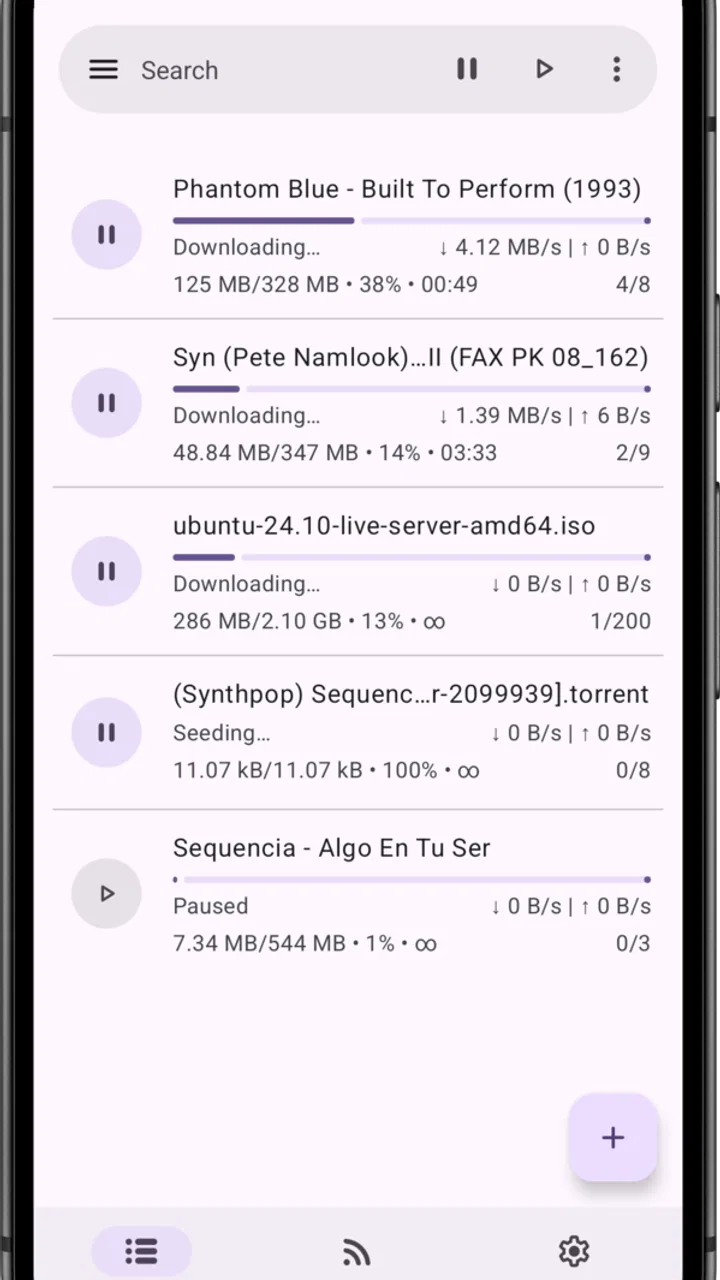
The first thing I noticed is that the application’s appeal comes from control. With many mainstream mobile download tools, the experience is built around a service, an account, or a catalog. LibreTorrent takes a different route. I can approach it with a magnet link or a torrent file, inspect the transfer, and decide how it should be handled. That makes it useful for legitimate open-source distributions, public-domain material, large personal files, and other content shared through lawful torrent networks.
You May Also Like

 Blood Strike: 2.5 Anniversary
Blood Strike’s Loadouts Turn Every Drop Into a Tactical Gamble
A close look at Blood Strike’s custom loadouts: how fast access to signature weapons reshapes its battle royale rhythm, rewards preparation, and narrows the gap between fights.

 Pandora - Music & Podcasts
Pandora’s Music Is Easy to Start, but Harder to Recover
Pandora’s strength is its low-effort path from a seed to a station. Its weak spot is how much confidence it asks you to place in connection, setup, and quiet recovery.

 8 Ball Pool
 Is Built on Rivalries, Rematches, and Routine
A close look at the rivalries, rematches, shared routines, and unanswered safety questions that turn a quick pool match into a persistent mobile community.

 Samsung Music
’s Quiet Strength Is Playing What You Already Own
Its reach comes less from spectacle than from dependable access to a personal library. That simplicity is both the app’s strongest retention engine and its ceiling.

 AccuWeather: Weather Radar
AccuWeather Review: A Quick, Clear Forecast for Everyday Decisions
For everyday plans, the best forecast is the one you can understand quickly. AccuWeather makes rain timing, radar, and local conditions easy to act on, with a few trade-offs.

 Hill Climb Racing
Why Hill Climb Racing Still Turns Crashes Into One More Run
A tiny car, a bumpy hill and one more upgrade: Hill Climb Racing keeps resurfacing because its simple chaos makes every near-miss feel personal.
More From Our News Desk



The basic workflow is easy to understand once the terminology is familiar. I add a torrent, review its contents, select the files that matter, and start the transfer. From there, the important information is the status of the job: whether it is waiting, downloading, or sharing completed pieces. I appreciate that this keeps the app’s purpose visible instead of hiding it behind an attractive but confusing interface.
One of the more useful habits is to inspect a torrent before starting it rather than accepting every file automatically. A torrent may contain several versions, documentation, sample files, subtitles, or folders that I do not need. Choosing only the relevant items saves storage and reduces unnecessary traffic. This selective approach is especially helpful on a phone, where internal space can disappear quickly and moving a large download later is inconvenient.
Another practical advantage is the ability to treat downloads as a queue instead of as isolated actions. If I have several lawful transfers to manage, I can avoid starting all of them at full speed at once. That matters when I am using a home connection for other tasks or when the phone is connected through a limited mobile plan. A torrent client is only as comfortable as the network conditions around it, so restraint often produces a better experience than simply maximizing every available connection.
I also found that the app suits people who want to keep their file workflow separate from their media workflow. LibreTorrent handles the transfer, while a file manager or media player handles the finished content. That separation may feel less convenient than an all-in-one streaming service, but it gives me a clearer view of where files are stored and what happens to them after the download finishes.
Why the open-source approach matters here
The open-source identity is more than a label for me. A torrent client deals with network activity, local files, and background transfers, so I prefer software whose development model is visible rather than wrapped entirely in advertising or a proprietary platform. LibreTorrent’s copylefted approach gives the project a distinctly community-minded character, and that is one reason I would consider it before a flashy alternative.
That does not mean open source automatically makes an app perfect. It does not remove the need to keep the application current, check the legitimacy of a source, or understand how a torrent behaves after the download completes. What it does provide is a different relationship with the tool. I am using a utility designed around function and transparency rather than a storefront designed to keep me inside one company’s service.
The project has been available since October 18, 2016, which gives it a longer history than many short-lived utility apps. Its current version is 4.1.1, and it runs on Android 7.0 or later. Those details make it a realistic option for people with older Android phones, although I would still pay attention to how an aging device handles storage, battery use, and background activity. Compatibility alone does not guarantee a smooth experience on every older handset.
The details that make a real difference
One non-obvious strength is that torrent downloading is not limited to a single large file. The file-selection step can change the whole experience. For example, if I am downloading a legitimate software archive that includes installers for several platforms, I can avoid filling my phone with versions intended for computers I do not own. This is a small decision, but it turns LibreTorrent from a blunt download button into a more efficient file-management tool.
A second useful insight is that completion and availability are not the same thing. A download can finish, but sharing may continue afterward depending on how the torrent is handled. I therefore treat a completed transfer as a point where I should review the job, the saved files, and my network situation, not as a reason to forget the app entirely. That habit is important for anyone who wants predictable data use and a tidy download list.
A third trade-off appears when choosing between phone storage and removable or shared storage. Saving directly to a convenient location can make files easier to find, but it may also expose them to the limitations of that storage setup. I prefer deciding on the destination before starting a large transfer, because moving a partially downloaded item can create unnecessary friction. On a phone with modest free space, this planning is more valuable than any cosmetic interface improvement.
There is also a privacy-related practical lesson: a torrent client does not make a questionable source trustworthy. LibreTorrent can manage a transfer, but it cannot turn an unknown torrent into a safe one. I would use it with reputable sources, check filenames carefully, and avoid opening unexpected files just because a download completed successfully. That is not a criticism unique to this app; it is part of using this type of software responsibly.
A realistic everyday scenario
Imagine that I need a large, legally shared Linux image or a public-domain video collection for a trip. Downloading it directly through a browser may be fragile if the connection drops, while a streaming service may not offer the material at all. I can add the torrent to LibreTorrent at home, select only the files I need, and let the transfer proceed while the phone is connected to a stable network. Later, I can open the finished files with the appropriate Android app and remove the torrent job when I no longer need it.
That workflow is more deliberate than tapping a download button in a conventional app, but it is also more flexible. I am not depending on a single web session, and I can inspect the contents before committing storage. The downside is that I have to understand the source, the file structure, and the network behavior. For me, that is a fair exchange when I genuinely need torrent distribution rather than ordinary direct downloading.
Where LibreTorrent is less comfortable
The biggest weakness is not that the app fails at its central purpose; it is that torrent technology can feel technical on a phone. A newcomer may wonder why a transfer is slow, why a file is waiting, why a magnet link takes time to resolve, or why a completed download still appears in the client. LibreTorrent can provide the tool, but it cannot remove the concepts behind peer-to-peer sharing. Someone looking for a one-tap, fully managed media experience may find the learning curve unnecessary.
Speed can also vary for reasons outside the app. The availability of peers, the health of the torrent, the quality of the connection, and local network restrictions all affect results. I would not judge the application solely by one slow transfer, but I would also not recommend it to someone who expects every download to behave like a fast direct server download. In that situation, a normal browser download or an official content provider is usually the better option.
Background downloading is another area where expectations need to be realistic. Android devices may manage battery and background activity aggressively, especially when power-saving settings are active. If a transfer matters, I would check the phone’s battery and background restrictions rather than assuming every client can run indefinitely without interruption. This is a phone operating-system reality, but it can still feel like an app problem when a transfer pauses unexpectedly.
The app’s focused design may also seem plain beside commercial torrent clients that add extensive account systems, cloud integrations, media libraries, or polished onboarding. I see that simplicity as a benefit when I want a dedicated utility, but it becomes a limitation if I expect the client to organize, catalog, and play everything for me. LibreTorrent is closer to a capable transfer tool than a complete media center.
How it compares with the usual alternatives
Compared with downloading through a browser, LibreTorrent is better suited to large transfers that may need to continue over time or resume through a peer-to-peer network. It also gives me more visibility into the files inside a torrent. The browser remains preferable for a small file from a trusted official website, because it involves fewer steps and less technical knowledge.
Compared with commercial torrent clients, LibreTorrent’s strongest argument is its free, open-source character and its lack of dependence on a branded content ecosystem. I would choose it when I value a focused tool and want to keep the process under my control. A commercial alternative may be more attractive to someone who prioritizes guided setup, integrated media handling, or a more familiar polished experience, even if that comes with a different approach to monetization and software ownership.
Compared with streaming apps, the difference is fundamental. Streaming is immediate and convenient, but it depends on a catalog, a connection, and the provider’s rules. LibreTorrent is useful when I need an actual local file from a legitimate torrent source. It requires more responsibility and patience, but it can serve situations where streaming is not the right format.
Who should use it, and who should skip it
I would recommend LibreTorrent to technically comfortable Android users who want a free torrent client for lawful downloads and who appreciate open-source software. It is a particularly good fit for people who manage large files, need selective downloading, or want to keep transfers separate from their media player. The app also makes sense for users with older Android devices, since the minimum operating-system requirement reaches back to Android 7.0.
I would not make it my first recommendation for someone who has never used torrents and simply wants to watch a movie or listen to music. A legitimate streaming or direct-download service will be easier, safer, and more immediate for that purpose. I would also steer away users who do not want to monitor storage, network use, file sources, and background behavior. This is not an install-and-forget service; it rewards attention.
The public response suggests that the app has found a substantial audience: it has passed one million installs, holds an average rating of 3.8 from around eight thousand ratings, and has about three hundred written reviews. I read that as evidence of useful reach rather than a guarantee that every device or workflow will be equally satisfying. The free price lowers the risk of trying it, while the Everyone rating describes its presentation, not the legal responsibility attached to the files a user chooses to download.
My verdict after using it
LibreTorrent succeeds because it stays focused. It gives me a straightforward way to manage legitimate torrent transfers without forcing the experience into a commercial media platform. The most valuable parts are not flashy: selecting only the files I need, planning storage before a large download, understanding what happens after completion, and keeping the transfer tool separate from the app that opens the finished file.
Its limitations are equally clear. Beginners may need time to understand torrent behavior, speeds depend heavily on the source and network, and Android’s background management can require attention. Anyone seeking instant entertainment should choose a different kind of app. But for a user who specifically needs peer-to-peer file distribution and values a free, copylefted, open-source project, LibreTorrent is a sensible recommendation rather than a novelty.
My final advice is to start with a small, unquestionably legitimate torrent, choose the destination carefully, inspect the included files, and watch how the phone handles the transfer. If that workflow feels comfortable, the app can become a dependable utility. If it feels like too much management for a simple download, a browser or official provider will serve you better. That honest dividing line is what makes this app easy for me to recommend to the right friend, even though I would not recommend it to everyone.
FAQs for LibreTorrent
01What is LibreTorrent, and what can I use it for?
LibreTorrent is an open-source BitTorrent client for Android devices. It allows you to download and share files using torrent files or magnet links, while offering controls such as download priorities, selective file downloading, bandwidth limits, and connection settings. It is designed for users who want a feature-rich torrent manager without depending on a proprietary desktop-style application.
02Is LibreTorrent free to download and does it contain advertisements?
LibreTorrent is generally available as free, open-source software and is known for focusing on functionality rather than intrusive monetization. The exact availability and package may depend on where you download it, such as an official repository or an alternative app store. Before installing, check that the source is trustworthy and review the listed permissions and version information.
03Can LibreTorrent download files in the background?
Yes, LibreTorrent is intended to manage torrent downloads while you use other applications or lock your phone. However, background performance can be affected by Android battery-saving settings, restricted background data, storage access, or manufacturer-specific task-killing features. For reliable transfers, you may need to exclude the app from battery optimization and keep sufficient free storage available.
04What permissions and storage access does LibreTorrent require?
LibreTorrent needs access to network connectivity so it can communicate with peers and transfer data. It also requires permission to save downloaded files in the location you select. On newer Android versions, storage access is controlled more carefully, so the app may use a system file picker or request access to a chosen folder. Only grant permissions that match your intended use.
05Is using LibreTorrent legal and safe?
The LibreTorrent application itself is a legal tool, but the legality of downloading or sharing content depends on the files and your local copyright laws. Use it for content you own, public-domain material, or files distributed with permission. For safety, download LibreTorrent from a reputable source, avoid suspicious torrent files, and remember that torrent activity can expose your IP address to other peers.
Pros
- Open-source and free
- with no ads or tracking built into the app.
- Supports magnet links
- torrent files
- and multiple download queues.
- Offers detailed controls for bandwidth
- connections
- and file priorities.
- Can download selected files instead of the entire torrent.
- Supports scheduling and automatic actions for hands-free downloading.
Cons
- Some advanced settings may feel overwhelming for first-time torrent users.
- Background downloads can be limited by aggressive Android battery management.
- Large torrents may use considerable storage and mobile data unexpectedly.
- The interface is functional but less polished than some commercial alternatives.
- Torrent availability and download speeds depend heavily on external seeders.

LibreTorrent
Gallery